What you need
Windows 10 or later, with Beyond All Reason installed. Windows only for now.
Community
The same numbers as the website, where you play and where you chat. See a player's habits from the lobby, ask for them in Discord, and find the creators who work with BAR Fight.
In-game widget · Windows · beta
View recorded player traits and build timings inside BAR. Open the panel with the BAR Fight button or /barfight. Pick a player and a position to see what they usually do, with the number of games behind it.
Beta release. Some features may not work reliably yet while we improve the widget. Report a problem.
Windows may say the publisher is unknown.
The installer is not code-signed yet. If you are unsure, check it against the SHA-256 checksum first. Read why in Help
Swipe sideways to see the whole panel
What it shows
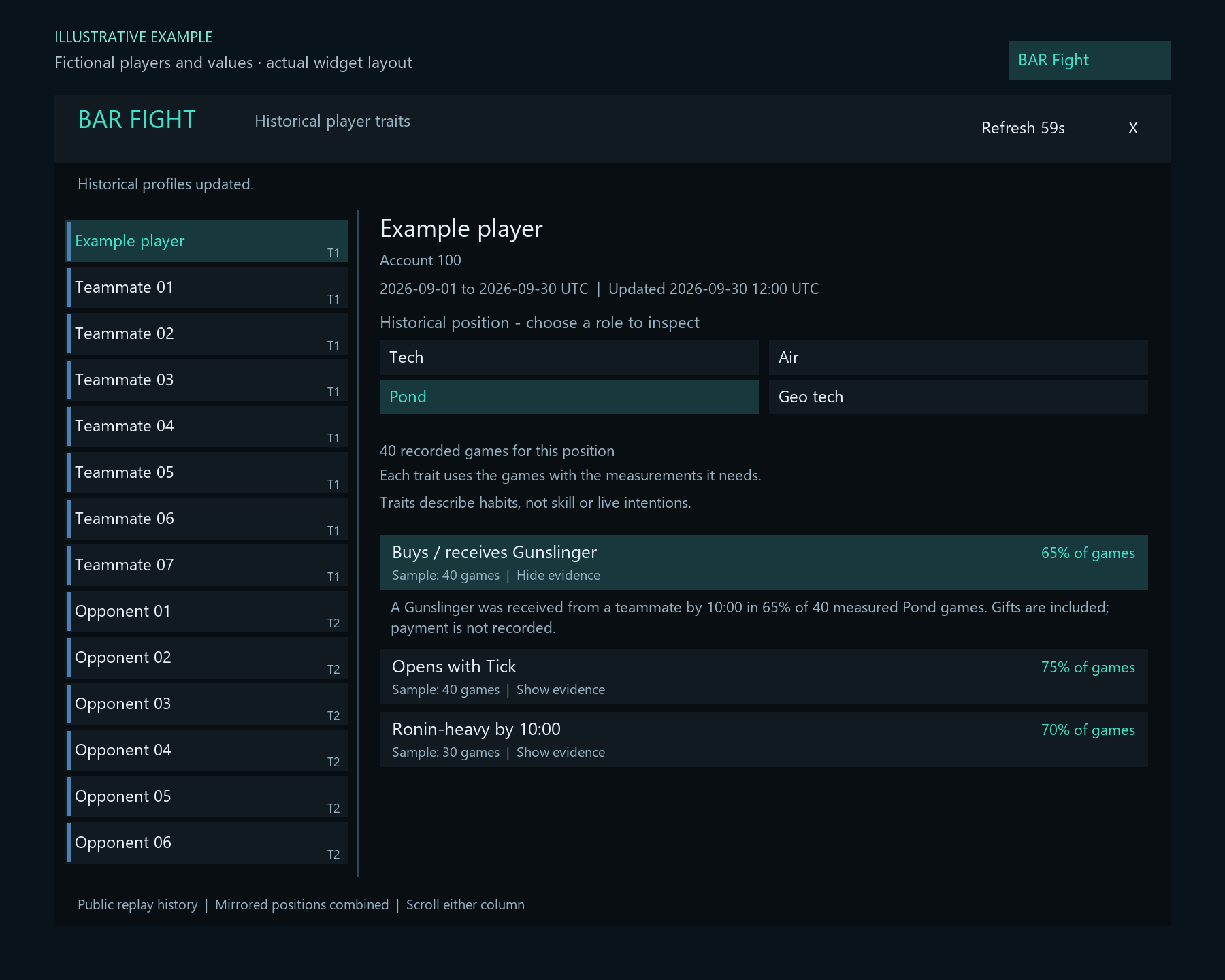
Tap a number on the picture, or read down the list. Everything the panel shows describes past games.
Opens and closes the panel. You can also type /barfight.
Dates and update status stay above the position choices, so you always know how old the numbers are. A small dot at the bottom shows whether BAR Fight was reached.
Everyone in the match. Click a name to see their habits. Hover a name in BAR's own list for a quick popup with up to four habits.
Choose a historical position to inspect. Mirrored starting positions are combined. It also tells you how many recorded games sit behind it.
Each habit has its own percentage and sample, for example "65% of games, sample 40 games". Habits are not a skill rating or a prediction of this match.
Click a habit to read in plain words how it was counted. Missing or unfinished builds are never counted as zero.
Install
The Windows installer sets up the widget and its helper for your user account. Keep the helper running while you play; updates wait until BAR is closed.
Good to know
Download and open BAR-Fight-Setup-0.1.15.exe. It also upgrades earlier versions installed for the same BAR data folder. Setup lets you choose profile fetching, automatic updates and Windows startup independently.
Select the folder containing LuaUI. The parent installation folder also works if it contains data/LuaUI.
Keep the helper running while you play. You can opt into starting it when you sign in to Windows, or open BAR Fight helper from the Start menu before playing.
Restart BAR or reload its UI. Enable custom widgets if needed, then enable BAR Fight Traits in the widget list.
Click the BAR Fight button or type /barfight. Select a player on the left, choose a historical position, then click a trait to see its evidence.
Before you install
Windows 10 or later, with Beyond All Reason installed. Windows only for now.
The current map name and up to 16 public BAR account IDs are sent over HTTPS to retrieve cached profiles. The widget does not record gameplay, upload local replay files or start simulations. Read the details in Help.
Windows may say the publisher is unknown because the installer is not code-signed yet. If you are unsure, check the download against the SHA-256 checksum. Read why in Help.
Going deeper
Profiles describe recorded games. Check the panel's dates and update status when reading the traits.
The BAR Fight button or /barfight opens and closes the panel. It shows positions, dates, samples, explanations and update status.
The BAR Fight player list shows each player's most-played spot and its share of recorded position games, for example Tech 70% est. It uses the last 30 UTC days, including games whose trait measurements are still being prepared. This is past frequency, not a guaranteed choice, and does not adjust for teammates' picks.
When BAR exposes the actual start, it becomes Tech (detected). Hidden starts keep the estimate; ties show Mixed spots. Hover the player for the history size and dates. An asterisk marks saved history.
Select a player and position, open Build timings, then use the quick choices for that role or search for a unit or group such as T2 constructors. You can also type /barfight timing, or select a group directly with /barfight timing group:t2-constructor.
Click Unit / Search and type a name. Use Up/Down or the mouse wheel to browse; Enter selects the first visible result. Escape, Tab or clicking outside returns keyboard control to the game.
See the average first-ready time and the number of games used in that average. For example, 4:42 / 18 games means 4 minutes 42 seconds from game start, averaged over 18 games with an observed completion. Missing or unfinished builds are not zero-second completions. These are past timings, not targets. Copy timing copies Player - Position - Unit - Average ready time, ready to paste wherever you choose. Nothing is sent to chat automatically.
Unfinished units handed to allies count when they actually finish, credited to the player who started them. Receiving another player's unit does not count as creating it.
Quick choices cover sea openers, Tech constructors and economy, Front factories, Geo tech units and Air units. Faction selection narrows unit choices and group members; All factions shows them all. It does not filter the historical game list.
Unit icons appear beside quick choices, the selected unit and search results, using pictures from the installed game. Group icons are examples; timings include every matching unit in the group. Missing pictures show a question mark; no images are downloaded.
In standard Supreme Isthmus 8v8 games, BAR Fight uses the available starting spot and selected starting commander to detect the faction, rather than the lobby default. Hidden enemy information stays unknown. Click either selector to change it manually or return to automatic selection; mirrored starts are combined. Choosing a historical position does not change the detected spot in the player list. If the starting spot is unavailable, the most-played recorded position is labelled history. This describes a starting spot, not a fixed responsibility throughout the game.
Help
Recorded habits describe past games; they are not a skill rating or a prediction of this match. How the replay data works →
Windows signing is not currently available for this installer, so Windows may show an unknown publisher. The published SHA-256 checksum is available if you want to verify the downloaded file. Do not bypass a Windows security warning if you are unsure about a download.
We are applying to SignPath Foundation for free open-source signing. Approval is pending. Read our Code signing policy.
The helper checks periodically for a published update. It downloads the update and waits until BAR is no longer running before applying it. Version 0.1.6 adds this updater, so earlier installs need one installer upgrade; future widget updates can be applied automatically.
Open Windows Installed apps → BAR Fight Traits and uninstall. This stops the helper and removes its two widget files and request/response files, leaving other BAR widgets and game data in place. Restart BAR or reload its UI afterward.
To use another BAR data folder, uninstall first, then reinstall and select that folder.
Each habit uses its own measured games, so its sample can differ from the position's total. The panel shows the frequency and sample size; click the trait to read its explanation. Dates and update status stay above the position choices. Mirrored starting positions are combined. A common habit does not tell you what a player will do next.
Buys / receives is based on teammate transfers. Those can include gifts; the records do not prove payment.
Yes. Published replay data requires ranked, human-only games lasting at least five minutes with equal-sized opposing teams. Games with unit bans, custom unit definitions, gameplay multipliers, altered starting resources, no-rush timers, disabled fog of war, evolving commanders, zombies or assist drones are excluded. Extra or Scavenger unit packs, disabled ally assistance or unit sharing, sharing taxes, quick-start bonuses, alternative victory conditions, lava water, base builder turrets, ruins, lootboxes and custom balance patches are also excluded. During backward backfill, isolated older imports are held out of all public statistics until the scan reaches their dates. Published results update with the daily refresh. The widget and website use the same combined replay history and trait rules, with each game counted once. Daily updates start at 03:00 Stockholm time; replay collection continues. The widget covers Supreme Isthmus v2.1, human 8v8 games lasting at least five minutes, over the last 30 UTC days. To compare the numbers on the website, choose the same dates, position and 8v8 format, with game version and faction set to All.
Construction traits use completed builds; Buys / receives uses recorded teammate transfers. Each trait shows the games with usable measurements, so its sample can be smaller than the position's total.
The small connection indicator at the bottom of the panel shows whether BAR Fight was reached, is being checked, or is showing saved profiles. It also identifies when the helper has not replied or profile fetching is turned off. A successful connection does not mean every player has enough history.
Each habit needs at least 10 games with the required measurements in that position. A larger history total does not mean every game has those measurements. Missing account IDs, insufficient history, no qualifying habits and offline results have separate messages. Players you open are prioritised in the background. While their history is being prepared, the helper checks again automatically; this is separate from having too few recorded games. Use /barfight refresh to request an update for the current traits or timing view. This does not create missing measurements. When cached history is stale, the panel keeps a warning visible. Missing traits are not a negative rating.
Yes. Hover over a player's name in BAR's built-in player list and pause briefly for a compact popup with up to four habits. The full panel remains available through the BAR Fight button or /barfight.
Ordinary list clicks and resource or ping tooltips are preserved. A custom replacement player list may need its own integration. If a future game update changes the built-in list in an unsupported way, the original list stays in place and the separate panel remains available.
The current map name and up to 16 public BAR account IDs are sent over HTTPS to retrieve cached profiles. Build-timing requests also send the selected unit or group; the same privacy setting controls both lookups. Account IDs match players without guessing from names. The widget does not record gameplay, upload local replay files or start simulations.
The helper and widget exchange small local files in LuaUI/Config. Hovering makes no network request. The helper responds to widget requests and otherwise stays idle. A pending fetch may retry briefly after you disable the widget.
Version 0.1.7 lets you turn off profile fetching in setup independently of automatic updates. Later, set FetchProfiles=0 under [Privacy] in bar-fight.ini to disable new lookups. Read the widget privacy policy.
No help item matches that. Try a shorter word, or ask us.
Discord bot · 15 slash commands
Look up player profiles and build times, try replay quizzes, or race a friend to a build target. Type /barfight and Discord shows what to fill in.
What you can do
Discord shows the required options when you pick one.
Player profiles, OS history, habits and build timings.
Player data commandsMap records for everyone or a selected player.
Player data commandsDuels with 3–50 questions and private rounds and a public final result.
Replay quiz commandsOpen group quizzes with a two-minute joining window for up to 16 players.
Replay quiz commandsDaily quizzes with saved progress and weekly scores.
Replay quiz commandsBuild races decided by your next qualifying BAR matches.
Build race commandsAdd it to a server
Choose a server where you have permission to add apps, authorize BAR Fight, then use its slash commands in an allowed channel.
Permissions it asks for
The install link does not request Administrator.
Use the Add BAR Fight to Discord button and choose your server. You need the Manage Server permission.
Allow View Channels, Send Messages, Embed Links and Send Messages in Threads where you want to use the bot.
Type /barfight help in an allowed channel. Choose commands and fields from Discord’s picker; members need Use Application Commands.
To control access, open Server Settings → Integrations → Manage beside BAR Fight. Set allowed channels, roles or members, or customize individual commands.
Commands
Type /barfight then pick a command. Fields in [square brackets] are optional. Tap an example to copy it.
Show a published player profile, activity, maps and recorded OS.
Fieldsplayer
Show recorded OS history, separated by game format.
Fieldsplayer
Show player habits with dates and sample counts; optionally choose a map and position.
Fieldsplayer[position][map]
Show average and median first-ready times for a player’s unit or unit group.
Fieldsplayerunit[position][map]
Show fastest, average and median completion on a map. Omit player for everyone; optionally choose position. Naval balance tweaks are included; other unsupported game settings remain excluded. Flagship includes Epoch, Black Hydra and Neptune.
Fieldsmapunit[player][position]
Open a two-minute lobby for 2–16 players. Anyone with access to the channel can join; choose 3–50 mixed rounds (default 5).
Fields[map][os_min][os_max][questions][game_mode]
Challenge a Discord friend to 3–50 mixed questions with optional map and game-mode filters (default 5), optionally within an OS range.
Fieldsopponent[map][os_min][os_max][questions][game_mode]
Start or resume today’s private map quiz. Optional OS range; finish before midnight UTC.
Fieldsmap[os_min][os_max]
Show this server’s completed duel and open quiz scores: three points for a win, one each for a tie for first.
Fieldsnone
Show weekly daily scores for this server and map, Monday to Sunday UTC. Up to 500 points per day.
Fields[map]
Choose a Discord friend, map, build and your BAR account. Your friend accepts and selects a different account.
Fieldsopponentmapunitplayer
Show your pending and active build races in this server.
Fieldsnone
Show this server’s build race scores: three points for a win, one each for a draw.
Fieldsnone
Get the BAR Fight Discord invite link in a private reply.
Fieldsnone
Show the commands, data context and limitations in Discord.
Fieldsnone
How quizzes work
Choose any available map. Questions mix replay patterns with combat puzzles: hits to destroy a unit, volleys, reload timing and resource trade-offs. Replay questions use at least five games; unit and map knowledge use their source definitions. Multiplayer map rounds award one point to the closest marker, with shared points for exact ties. You can add an OS range to use ratings recorded in the replay.
Questions and round reviews stay private during a duel. The final result goes to the channel, including both players’ answers and scores. Daily challenges reset at midnight UTC.
Scoring in one line
A numeric round awards one point to the closest player or players. An option round awards one to each correct player. Duel and open quiz scores: three points for a win, one each for a tie for first. Daily scores: up to 500 points a day.
/barfight quiz to open a group lobby.OS bounds are inclusive and use the rating recorded in each replay. Leaving both empty includes all ratings. Filtered quizzes exclude unknown ratings and whole-match loss questions.
For races, accept within 24 hours, then play within seven days. Each account’s first standard human PvP match on that map, lasting at least five minutes, counts even if the target is never completed. Faster completion from game start wins. Replay processing can delay results; check /barfight races.
Search players with at least two characters, or enter a BAR account ID. Select maps and units from the picker. Brackets mark optional fields. Traits, timing and dailyboard default to Supreme Isthmus v2.1.
Quizzes mix openings, first factories, build counts, unit popularity, technology order, production mix, teammate handovers, construction outcomes, timing, economy and losses. Replay questions use at least five measured games, never one selected replay or BAR player. The question names its map, position, format and optional OS range. Available topics depend on the data.
New replay rounds include opening continuations, production changes, T2 constructor supply routes, metal sharing, position energy curves, construction duration, factory outcomes, rebuilding, unit survival, recorded kill relationships and construction changes around enemy technology. These require at least 30 measured games and ten players; unavailable evidence is skipped.
Most new rounds offer four answer buttons in the Activity: select one, then Lock in answer. Some rounds still accept a number or time. Correct option answers earn one duel point or 100 daily points.
About the data
The bot reads the same published replay data as BAR Fight. Daily updates start at 03:00 Stockholm time. Replay collection continues while the update is prepared. New games and race results appear after processing finishes.
Not every BAR match is included, and some maps or filters may have too little data for a quiz.
The in-game widget shows the same habits and timings on the scoreboard.
Partners
Find our partners on Twitch, YouTube and Discord. Partners are creators who make Beyond All Reason content and work with BAR Fight.