Community

Take BAR Fight into your games and your Discord, and meet the people who support it.

The same numbers as the website, where you play and where you chat. See a player's habits from the lobby, ask for them in Discord, and find the creators who work with BAR Fight.

Discord bot · 16 slash commands

Replay tools in your server

Look up player profiles and build times, try replay quizzes, or race a friend to a build target. Type /barfight and Discord shows what to fill in.

  • Manage Serverneeded to add it
  • No Administratorthe link does not ask for it
  • Servers onlyno direct messages
  • Same dataas the website
+/barfight timing player:SkyFireEX unit:Fusion
  • /barfight playerShow a published player profile, activity, maps and recorded OS
  • /barfight osShow recorded OS history, separated by game format
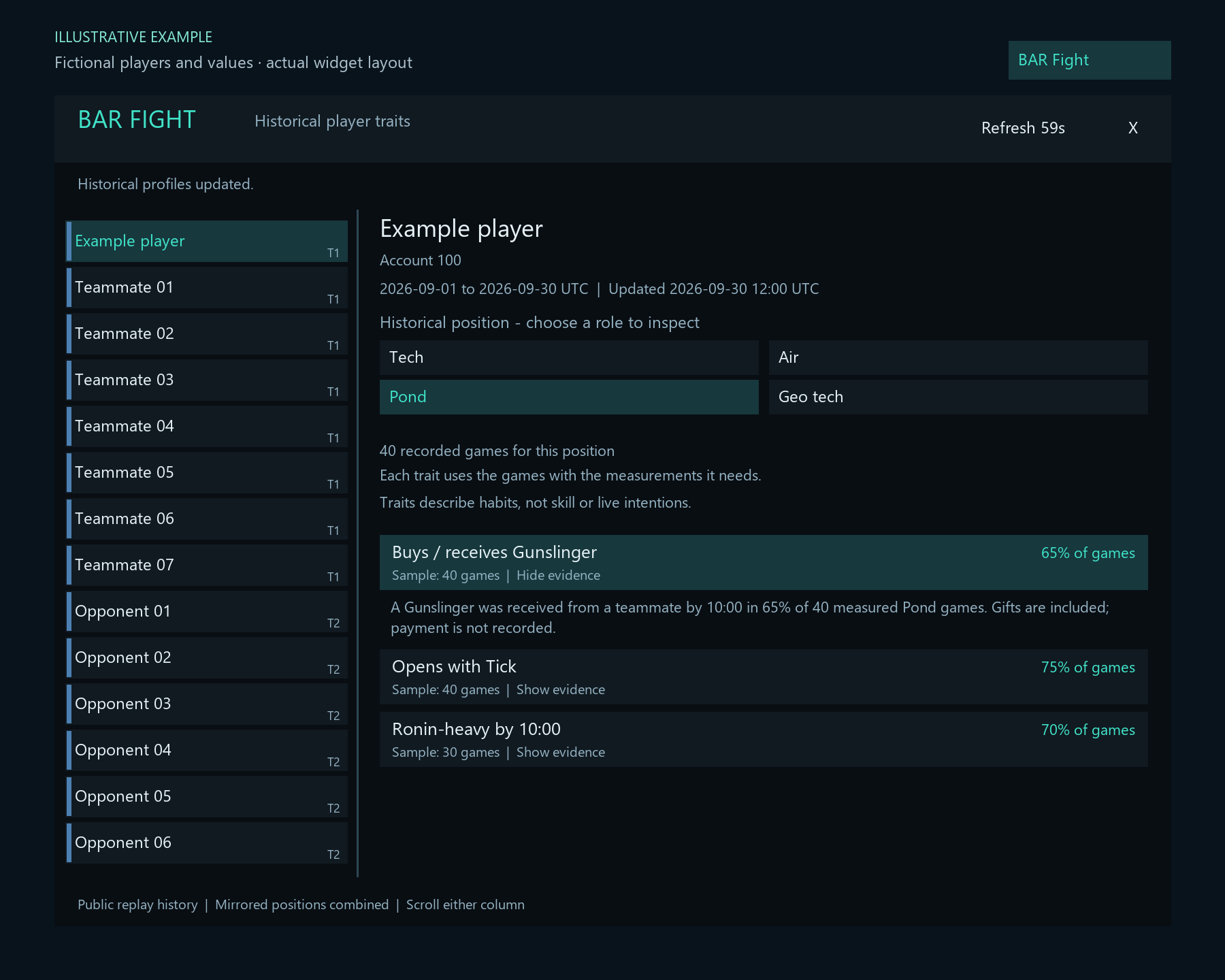
  • /barfight traitsShow player habits with dates and sample counts; optionally choose a map and position
  • /barfight timingShow average and median first-ready times for a player’s unit or unit group
  • /barfight buildsShow fastest, average and median completion on a map
  • /barfight wordleBARdle: daily, endless or multiplayer Battle Royale, with a clue-filtered unit picker
  • /barfight quizOpen a five-minute lobby for 2–16 players
  • and 9 more, including duel, race and help
Sketch of Discord's command picker. Commands and descriptions are the real ones.

What you can do

Start with a command

Discord shows the required options when you pick one.

Add it to a server

Four steps

Choose a server where you have permission to add apps, authorize BAR Fight, then use its slash commands in an allowed channel.

Permissions it asks for

View ChannelsSend MessagesEmbed LinksSend Messages in Threads

The install link does not request Administrator.

  1. 1

    Add the bot

    Use the Add BAR Fight to Discord button and choose your server. You need the Manage Server permission.

  2. 2

    Allow the channel permissions

    Allow View Channels, Send Messages, Embed Links and Send Messages in Threads where you want to use the bot.

  3. 3

    Try it

    Type /barfight help in an allowed channel. Choose commands and fields from Discord’s picker; members need Use Application Commands.

  4. 4

    Control who can use it

    To control access, open Server Settings → Integrations → Manage beside BAR Fight. Set allowed channels, roles or members, or customize individual commands.

Commands

All 16 commands

Type /barfight then pick a command. Fields in [square brackets] are optional. Tap an example to copy it.

Player data

/barfight player

Show a published player profile, activity, maps and recorded OS.

Fieldsplayer

Player data

/barfight os

Show recorded OS history, separated by game format.

Fieldsplayer

Player data

/barfight traits

Show player habits with dates and sample counts; optionally choose a map and position. Verified factory releases can fill missing unit finishes; exact finishes are preserved. Games with incomplete completion coverage do not supply complete production totals.

Fieldsplayer[position][map]

Player data

/barfight timing

Show average and median first-ready times for a player’s unit or unit group.

Fieldsplayerunit[position][map]

Player data

/barfight builds

Show fastest, average and median completion on a map. Omit player for everyone; optionally choose position. Naval balance tweaks are included; other unsupported game settings remain excluded. Flagship includes Epoch, Black Hydra and Neptune.

Fieldsmapunit[player][position]

Replay quizzes

/barfight wordle

BARdle: daily, endless or multiplayer Battle Royale, with a clue-filtered unit picker.

Fields[mode]

Replay quizzes

/barfight quiz

Open a five-minute lobby for 2–16 players. Anyone with access to the channel can join; choose 3–50 mixed rounds (default 5).

Fields[map][os_min][os_max][questions][game_mode]

Replay quizzes

/barfight duel

Challenge a Discord friend to 3–50 mixed questions with optional map and game-mode filters (default 5), optionally within an OS range.

Fieldsopponent[map][os_min][os_max][questions][game_mode]

Replay quizzes

/barfight daily

Start or resume today’s private map quiz. Optional OS range; finish before midnight UTC.

Fieldsmap[os_min][os_max]

Replay quizzes

/barfight leaderboard

Show this server’s completed duel and open quiz scores: three points for a win, one each for a tie for first.

Fieldsnone

Replay quizzes

/barfight dailyboard

Show weekly daily scores for this server and map, Monday to Sunday UTC. Up to 500 points per day.

Fields[map]

Build races

/barfight race

Choose a Discord friend, map, build and your BAR account. Your friend accepts and selects a different account.

Fieldsopponentmapunitplayer

Build races

/barfight races

Show your pending and active build races in this server.

Fieldsnone

Build races

/barfight raceboard

Show this server’s build race scores: three points for a win, one each for a draw.

Fieldsnone

Help

/barfight discord

Get the same BAR Fight community Discord invite used by the website and quiz Activity.

Fieldsnone

Help

/barfight help

Show the commands, data context and limitations in Discord.

Fieldsnone

How quizzes work

Questions, rules and deadlines

Choose any available map. Questions mix replay patterns, ten-piece unit picture puzzles and combat puzzles: hits to destroy a unit, volleys, reload timing and resource trade-offs. Replay questions use at least five games; unit and map knowledge use their source definitions. Multiplayer map rounds award one point to the closest marker, with shared points for exact ties. You can add an OS range to use ratings recorded in the replay. Ratings at either limit are included; games without a recorded rating are excluded when an OS limit is set.

New replay-question reveals show the measured data behind every answer option. Numeric choices also show their difference from the rounded answer.

Questions and round reviews stay private during a duel. The final result goes to the channel, including both players’ answers and scores. Daily challenges reset at midnight UTC.

Scoring in one line

A numeric round awards one point to the closest player or players. An option round awards one to each correct player. Duel and open quiz scores: three points for a win, one each for a tie for first. Daily scores: up to 500 points a day.

BARdle Battle Royale
  • Start /barfight wordle mode:royale, or choose Battle Royale from the BARdle Activity.
  • Create a lobby for 2–16 commanders, choose 1–5 starting lives and No time limit or 60, 90 or 120 seconds per round.
  • Untimed rounds end when every active player has solved or used all six guesses.
  • The bot posts a Join Battle Royale button in that channel, like the quiz: clicking it opens the Activity and joins the same arena.
  • Invite players also opens Discord’s invitation dialog.
  • Invites retain Discord channel permissions.
  • Your verified Discord username and avatar identify you; they cannot be entered as another player.
  • The arena belongs to its Discord channel, so separate Activity launches in that channel share the same lobby while seats remain.
  • Other channels and servers cannot join it.
  • After the host starts, new arrivals can spectate and chat.
  • The joining window is ten minutes, and only the host can start with at least two commanders.
  • Closed channel buttons reject new launches privately.
  • Optional simulated opponents are marked BOT; real-player lobbies use zero bots by default.
  • Everyone receives the same hidden unit each round and six private guesses.
  • The wider Battle Royale layout has no decorative side robots.
  • The portrait grid uses the normal BARdle search for names, codes, aliases, factions, tiers and types, plus Faction, Tier and Type filter buttons.
  • Search text and filters stay selected after guessing and between rounds; change them or use Clear filters.
  • Only revealed faction clues narrow the pool automatically.
  • Select a portrait and press Lock in guess beside search.
  • Unsuccessful players and the slowest quarter of successful solvers lose at most one life each round.
  • The fastest solver is always safe; ties at the cutoff are safe.
  • If nobody solves, the round is void without life loss.
  • At zero lives, watch and chat while the last commander standing wins.
  • Arena chat has emojis and scrollable history alongside game events.
  • Messages stay in that arena; you can remove your own messages and the host can moderate arena chat.
  • Any bot replies are scripted, not AI generated.
  • Every surviving player must press Next round before play continues; the ready count and player states show who is waiting.
  • Spectators and eliminated players do not hold up the round; optional bots confirm automatically.
  • Late joiners and eliminated players can use Spectate player to follow a selected player’s live guesses and clues.
  • Active players cannot inspect opponents’ boards.
  • The lobby starter or current host can use End lobby to close the arena for everyone and allow a new lobby in the channel.
  • Saved room state survives reconnects and updates.
  • Reopening loads one versioned set of Activity, Battle Royale and search assets, including through Discord’s asset cache.
  • When a newer interface is available while playing, Reload Activity loads it on request and keeps saved progress; it does not reload a match automatically.
  • A service restart voids only an unfinished timed round, keeping lives and completed rounds.
  • Battle Royale uses its own saved matches and does not alter Daily or Endless leaderboards.
  • It needs no replay processing, extra Discord permissions or OpenAI API calls.
BARdleDaily, endless & Battle Royale · Unit deduction
  • Use /barfight wordle mode:endless for unlimited rounds; finish a unit, then choose Next unit.
  • Daily and endless have separate global leaderboards.
  • A one-guess solve earns 6 points, down to 1 for six guesses; losses score 0.
  • Open Leaderboard to choose This week, This month or All time.
  • Endless also offers Today.
  • All periods use UTC: weeks start Monday at 00:00, and months start on the first day.
  • Endless opens on Today; the daily-unit leaderboard opens on This week.
  • Older endless results without a recorded completion date count only in All time.
  • Active sessions stay signed in while you play.
  • After a long idle period, the Activity renews its app session without signing into Discord twice.
  • Updates reconnect the Activity and keep saved BARdle progress.
  • Choose Daily in BARdle, or use /barfight wordle mode:daily, to identify the daily BAR unit in six guesses.
  • The plain wordle command resumes your selected mode.
  • The command opens BARdle in the Discord Activity, with its visual clue board and image picker.
  • Only revealed faction clues filter the picker; previous guesses are also hidden.
  • Tier, type, metal, health and speed clues stay visible for you to interpret.
  • Search the remaining units or browse every page, with unit portraits, then choose Guess unit.
  • Guesses from a ruled-out faction do not use an attempt.
  • The private Discord fallback offers the same faction-filtered pool through Remaining units.
  • Shared names need a faction, such as Construction Bot (Armada).
  • Each guess compares faction, tech tier, unit type, metal cost, base health and speed.
  • Green means equal; yellow means a numeric value is within 25% of the answer; red means different.
  • Up means the answer is higher and down means lower.
  • The exact unit must match to win.
  • In daily mode, everyone gets the same unit for the UTC day.
  • Each Discord account has one private board across servers; progress survives bot restarts.
  • Invalid or repeated guesses do not use another attempt.
  • The standard-PvP pool has 573 units and buildings from Armada, Cortex and Legion, including T1, T1.5 seaplanes, T2, T3 and carrier drones.
  • Special-mode units, unused variants and invisible helpers are excluded.
  • Equivalent drone forms share one guess.
  • Building types distinguish land, naval and amphibious variants.
  • Clues use the pinned base definitions, without upgrades or mod options; speed is rounded to two decimals in elmos per second.
  • The answer is revealed after a correct guess or the sixth wrong guess.
  • Starting BARdle creates one public BAR Fight status message in that channel.
  • When you finish, the bot edits that same message with your result and spoiler-free emoji grid.
  • The answer, guessed unit names, clue values and unit images stay private.
  • Results stay attached to the original starting channel even if you resume elsewhere.
  • If the status message was deleted, the bot posts a replacement result there.
  • Saved finished results retry automatically every 30 seconds, including after a restart; you do not need to press Share result.
  • Your private board includes pictures of the units you guessed.
  • Share result also gives a private emoji grid to copy yourself.
  • Both the shareable result and the channel result include your Discord display name.
  • The next daily unit unlocks at 00:00 UTC.
  • BARdle is separate from replay quizzes and their leaderboards.
  • The Activity uses the existing Discord sign-in; no replay loading or extra Discord permissions are required.
  • If the Activity is unavailable, private Discord cards remain a fallback.
Group quizOpen lobby for 2 to 16 players
  • Start /barfight quiz to open a group lobby.
  • Choose an optional map, game_mode, or both.
  • Without a map, replay rounds can use different maps; each names its own map and format.
  • Game modes include 1v1, 2v2 through 8v8, FFA and Team FFA.
  • Unit and sound questions remain general knowledge.
  • Combinations without enough measured replay data ask you to change the selection.
  • Daily challenges still require a map.
  • Daily map suggestions list published maps alphabetically.
  • Quiz and duel commands accept questions:3 through questions:50; the default is 5.
  • The requested number must fit the available distinct question pool.
  • Daily challenges stay at 5 questions.
  • The host is joined automatically.
  • Questions can take a few seconds to load.
  • The 5-minute joining timer begins when the lobby opens.
  • Click Join quiz in the channel, or open a shared Activity invitation, within 5 minutes to join and open the Activity in one step.
  • Shared invitations do not require another click on the original quiz message.
  • Clicking again reopens an active quiz without joining twice.
  • Closed quizzes reject new launch and join attempts privately.
  • Discord-owned invitation cards can remain visible after a quiz ends.
  • At least two players are needed; otherwise the lobby closes without points.
  • Everyone can press Start in the Activity to begin early.
  • Each new joiner must also press Start; no one can join after the quiz starts.
  • Rounds reveal after everyone submits or the timer ends; everyone must click Next before the next question, while players who timed out do not block progress.
  • Player cards show Answer locked in and Ready for next question, plus a group progress count.
  • The host can end the group quiz in the Activity.
  • The round timer is two minutes.
  • Missing answers earn zero; the quiz continues, and missing players do not block the next round.
  • A numeric round awards one point to the closest player(s); an option round awards one to each correct player.
  • Final standings appear in the original channel; quizzes of up to five rounds also include round details.
  • Longer quizzes keep the posted summary compact.
  • Only players tied for first receive a draw point.
Sounds, maps and quiz chat
  • Unit picture puzzles show a large portrait split into ten pieces on a two-column, five-row board.
  • Drag pieces or tap two pieces to swap them; keyboard users can focus a piece and use arrow keys.
  • Lock in once the whole picture is correct.
  • A visible stopwatch runs until you lock in.
  • The fastest correct submission earns one point, using the server receipt time from round start; exact millisecond ties share the point.
  • A faster wrong picture earns zero.
  • Everyone can finish before the two-minute limit, and times appear at reveal.
  • The complete picture and unit name appear at reveal.
  • The pool covers all 573 standard-PvP units and buildings across Armada, Cortex and Legion, including T1, T1.5, T2 and T3.
  • A few units share artwork.
  • Faction and tier buckets rotate evenly; T1.5 shares the T1 selection bucket.
  • PvE, Scavenger, Raptor and optional-mode-only units are excluded by the same verified roster used for BARdle.
  • Players tied for first after the selected questions enter a tiebreaker.
  • Only the tied leaders answer; others can watch and chat without delaying play.
  • Each player’s result card shows their own outcome; players outside the tie are marked as watching.
  • Ties can trigger up to three fresh extra questions, with the normal two-minute timer.
  • A remaining tie shares the win; solo daily challenges do not have tiebreakers.
  • Identify the battlefield uses a 100-piece map puzzle in the quiz window.
  • It can appear in mixed quizzes with a specific map, All maps or a game-mode filter such as 8v8.
  • In multiplayer, everyone has a separate board with the same piece sequence and one piece already uncovered.
  • Reveal as many pieces as you need, then lock in one answer.
  • Among correct answers, the player with the fewest pieces wins one round point; equal counts share the point.
  • Speed does not break ties.
  • Answers and piece counts stay private until everyone submits or the two-minute timer ends.
  • Wrong or missing answers earn zero; other players can continue.
  • In daily challenges, everyone in the same day, map and OS range gets the same sequence.
  • A correct answer starts at 100 daily points and loses one per extra piece, down to one; wrong answers earn zero.
  • Daily progress survives reconnects.
  • The full map, author and piece counts appear at reveal.
  • Existing saved daily sets stay unchanged.
  • Use Join BAR Fight Discord beside the website link or in the final-results banner to open the community invite.
  • Joining is optional and does not change your quiz membership.
  • Sound rounds play a real weapon recording: use the audio controls in the Activity, then choose which of the four units fires it.
  • Sounds start at 50% volume; you can adjust the player volume.
  • Nothing plays automatically.
  • Sounds can be shared by other units outside the choices.
  • Starting-position questions show an exact-version map where a verified reference is available, with the named spots highlighted.
  • Collapse Starting positions to save space.
  • The quiz starter can open Manage players in the Activity and remove a disconnected participant.
  • Remaining players keep their scores and continue without waiting for that player.
  • If only one remains, they can finish as practice without competitive leaderboard points.
  • After every participant has opened the Activity, a quiz closes when Discord confirms everyone has left; a new quiz can then start.
  • Quiz chat opens beside the question on desktop and in a closable drawer on smaller screens.
  • Its message input stays visible.
  • New messages follow automatically only when you are at the bottom; otherwise a new-message button lets you catch up.
  • Collapsed chat shows an unread count.
  • Drafts and scroll position stay in place between rounds.
  • Use Watch quiz on the Discord quiz message or in the Activity to spectate.
  • Open group quizzes allow spectators with access to the same Discord channel, including after play starts.
  • Spectators see questions and answer reveals and can chat, but cannot answer, uncover puzzle pieces, earn points, advance rounds or hold up players.
  • Stop watching leaves spectator chat; while the lobby is open, Join quiz switches to playing.
  • Private duels and solo daily attempts cannot be spectated.
  • Quiz chat is visible to players and registered spectators in that quiz.
  • Use Choose emoji to insert an emoji into a message.
  • It is separate from Discord channel chat.
  • Messages are temporary: the latest 50 are kept in bot memory, expire after two hours without a new message, and disappear on restart.
  • Daily challenges are solo and have no participant chat.
Duels and the quiz window
  • Mixed quizzes rotate across combat, economy, unit knowledge, weapon sounds, build timings and replay patterns.
  • Fresh questions take priority over category coverage.
  • Recently used question types cool down when alternatives exist, and each sound recording is tracked separately.
  • If the available pool is exhausted, older questions can return.
  • Obvious factory-to-unit trivia is excluded.
  • First-ready comparisons exclude prerequisite pairs and widely separated game stages.
  • Combat questions hide supplied HP and damage figures; the answer review explains the calculation.
  • For a continuous quiz window, choose Join quiz on an open lobby, or Open quiz window on a duel or daily challenge.
  • The window shows its Discord connection and sign-in stages.
  • Routine server updates reconnect your saved game in the same window.
  • A slow Discord connection keeps waiting for up to one minute; Try again retries in the same window without resetting saved quiz or BARdle progress.
  • If Discord still will not connect, close and reopen the Activity, update or restart Discord, or try Discord in your browser.
  • Each participant opens the Activity in the original channel.
  • Accept the duel there; answer, wait, review and click Next without closing the window.
  • Both duel players must click Next.
  • Daily challenges are solo.
  • Closing and reopening resumes an active quiz.
  • The quiz window matches the website: cyan highlights show selected answers and players who are ready; amber marks waiting messages.
  • Revealed answers use green for correct and red for incorrect, with text labels.
  • Numeric duel results label the closest guess instead of calling an inexact answer correct.
  • On wide screens, animated red and blue robots cheer you on.
  • Use Pause animations to stop them; reduced-motion preferences are respected.
  • After the final round, Close quiz returns you to Discord.
  • Duel results and daily score summaries appear in the original channel; daily summaries do not reveal the answers.
  • The original popup controls remain available.
  • Duel: your friend clicks Accept; you click Start quiz.
  • Both answer privately, then review both guesses and the correct answer.
  • Both click Next question; the first person then uses Open question.
  • Discord closes the answer popup on submission; your private card shows waiting, results and Next question.
  • Accept, answer and review each allow two minutes.
Daily challenge and OS range
  • Daily questions are shared per UTC day, map and OS range.
  • You get one attempt per map/day across all servers and ranges.
  • Resume in the original channel with the same range.
  • Daily progress is saved; unfinished duels and open quizzes expire on a bot restart.
  • The Activity verifies your Discord identity and channel access.
  • It does not request your email or message history.

OS bounds are inclusive and use the rating recorded in each replay. Leaving both empty includes all ratings. Filtered quizzes exclude unknown ratings and whole-match loss questions.

Build races

For races, accept within 24 hours, then play within seven days. Each account’s first standard human PvP match on that map, lasting at least five minutes, counts even if the target is never completed. Faster completion from game start wins. Replay processing can delay results; check /barfight races.

Build record highlights
  • In the BAR Fight Discord server, #highlights announces new first-, second- or third-place Build Records for each map and published unit or building category.
  • All starting positions, game versions and factions are combined.
  • Each player contributes their fastest qualifying personal best; equal times share a rank, following the website.
  • Records measure completed builds from game start, not when construction began.
  • New records from a publication are grouped by map, with each player, unit or building, time, medal rank and replay link listed together.
  • Large map groups are split only when needed to fit Discord message limits.
  • On the website, Build Records show flagged commie strats by default.
  • Use the left and right arrows to browse all Build Records unit categories.
  • Position cards show the fastest player and build time for each start with the current filters; select a card to filter the records.
  • Each player can have a best flagged and best unflagged record.
  • Enable Hide commie strats beside Unit faction to show only unflagged records.
  • A geo or fusion handover, gifts totalling at least 300 E/s of rated fixed generation, or ten economy buildings (including full-base takeovers) qualify before the record.
  • Player profiles open with the overview first.
  • On Supreme Isthmus, personal build records load separately.
  • Record pages show a compact pooled-economy summary; expand Transfers & evidence for teammate groups, unit icons and handover times.
  • Transfer time is not building completion time or measured income.
  • One gifted T2 constructor does not qualify.
  • Unchecked records remain visible and are not proof of unassisted play.
  • This website filter does not change Discord highlights.
  • Build Records also group full-size nuclear silos, land and underwater T3 factories, and Ragnarok/Calamity/Starfall, with a separate Liche category.
  • Nuclear silo times measure the completed building, not its first armed missile.
  • Exact unit finish times take priority; a verified factory-release event can fill a missing finish for a produced unit.
  • A factory’s first output never supplies the factory building’s completion time.
  • New record categories appear in highlights after their map’s eligible games have been checked.
  • This does not change the available build-race or quiz targets.
  • A successful Build Records publication triggers announcements; the feed does not poll for new records on a timer.
  • A newly played game must first be included in that publication.
  • Failed or delayed Discord deliveries are retried from their saved queue.
  • Existing standings are saved silently when the feature starts.
  • A routine refresh or an unchanged personal-best time does not generate another post.
  • Posts do not ping players or roles.
  • This automatic feed is only enabled in the BAR Fight server; installing the bot in another server does not enable it there.
Development status updates
  • In the BAR Fight server, the private #dev channel receives import and publication updates: publication step changes, final completion, failures, periodic progress and one daily webhook import summary.
  • The daily report covers the previous 24 hours from midnight to midnight UTC and counts unique games successfully imported via Gex webhooks; duplicate deliveries, reused games, excluded matches and pending/review deliveries are not counted.
  • Importing is separate from website publication.
  • While missing-data refill runs, a progress report every three hours shows processed games, remaining games and the measured rate.
  • Partial or review cases are identified separately; collection progress is not website publication.
  • These operational messages do not ping members or change quiz sessions.
  • They are not enabled when the bot is installed in another server.
Finding players, maps and units
  • Search players with at least two characters, or enter a BAR account ID.
  • Website player profiles also have a Match history tab with map, format, faction, position and date filters, known-result win rates and activity.
  • Match rows link to map pages, available position guides and replays; format, faction and other recorded starts link to filtered history.
  • The list adapts to phone cards; About these matches explains coverage.
  • It covers published replays of at least five minutes, not a complete career.
  • The homepage includes published comments and anonymous current vote totals across the site, and voting/comment controls for the player saved in this browser.
  • The homepage groups recent activity into aligned columns: comments on the left and gameplay/behaviour feedback on the right, stacked on phones.
  • It initially shows three comments and five feedback entries; Show all expands each column independently, up to ten retained entries per column.
  • Each visible column cycles its entries every six seconds, retaining their original timestamps and vote totals.
  • Arrivals fade and slide in over 1.6 seconds, with a longer highlight.
  • Filters and queued arrivals keep reading stable; cycling is automatic without pause or cycle controls, and reduced motion starts with cycling off.
  • Website profile headers include community votes, a comments shortcut and lobby OS ranges using the average of all other players, excluding the profile player.
  • Each range shows its match share and the profile player’s win rate from known results only; unknown results and rating coverage are disclosed.
  • Map and format filters apply to both distributions and win rates.
  • Anonymous thumbs-up/down has separate play-quality and in-game behaviour questions, with one changeable vote per browser for each, separate from calculated skill.
  • Website comments require Discord sign-in.
  • Submissions are logged privately in the BAR Fight Discord modlogs channel and checked by Wick.
  • Unflagged comments publish after a verified active check; flags and unavailable checks go to mod-alerts for human review.
  • OpenAI is not used for website comments.
  • Profile headers show the latest published comments in a scrollable area (up to 50); Write a comment opens the separate Comments tab for posting and managing comments.
  • Pending or rejected submissions stay out of the header preview; record discussions belong to the Build Records entries.
  • Build Records rows open a separate shareable page with the exact match, full roster, recorded starting positions and its live discussion.
  • Lobby OS on that page averages all rated players in the match, including the record holder; missing ratings are excluded and coverage is shown.
  • Comments show public Discord avatars, with an initial if the image is unavailable.
  • Comment counts include approved comments only and are omitted when zero.
  • These website features do not change Discord quiz scores or grant game-account ownership.
  • Select maps and units from the picker.
  • Brackets mark optional fields.
  • For example: /barfight quiz map:Rosetta 1.4.4 os_min:20 questions:7.
  • OS bounds include the exact boundary and filter recorded replay ratings, not who can join.
  • Traits, timing and dailyboard default to Supreme Isthmus v2.1.
What the questions cover

Quizzes mix openings, first factories, build counts, unit popularity, technology order, production mix, teammate handovers, construction outcomes, timing, economy and losses. Replay questions use at least five measured games, never one selected replay or BAR player. The question names its map, position, format and optional OS range. Available topics depend on the data.

  • New replay rounds include opening continuations, production changes, T2 constructor supply routes, metal sharing, position energy curves, construction duration, factory outcomes, rebuilding, unit survival, recorded kill relationships and construction changes around enemy technology.
  • These require at least 30 measured games and ten players; unavailable evidence is skipped.
  • Production-share answers reveal every choice’s average share of completed-build metal value in minutes 0–10 and 10–20, plus the change in percentage points.
  • New percentage questions space answer choices at least 10 percentage points apart.
  • Unit-specific player percentages compare only players whose recorded starting faction matches the unit, including measured zero results; the question names that faction.
  • Each player-game counts once.
  • All new quiz questions use the verified normal-PvP roster for unit subjects, targets, answers and distractors, including replay, combat, sound, picture, puzzle and build-key questions.
  • Normal Armada, Cortex and Legion units, T3 units and carrier drones remain included.
  • Special-mode units and unused prototypes are excluded; older saved rounds keep their original choices.
  • Unit knowledge rounds include icon recognition, cost, health, theoretical DPS, speed and build-power comparisons, anti-air range and metal-and-energy budget puzzles.
  • Highest-stat comparison choices span at most 30% from lowest to highest; build-time and unit-stat numerical choices stay within 30% of the answer where four distinct choices are possible.
  • They use pinned game definitions and do not depend on the selected map or OS.
  • DPS uses the pinned unit definitions and stated target assumptions; actual battle damage can differ.
  • Combat puzzles include hits to destroy a unit, combined volleys, reload timing, remaining health, overkill, cheapest demolition, damage per metal and damage per energy.
  • Combat rounds rotate across T1, T2 and T3.
  • Comparisons use similar tiers and competitive options; multiweapon units name the one weapon being tested.
  • Targets and all answer-option units count towards repeat avoidance.
  • These are theoretical calculations, not predictions of real battles.
  • Unit pictures appear beside applicable Activity answer choices, except unit-recognition questions.
  • Replay puzzles compare destruction counts with metal lost, T1 factory outcomes after early T2, and completed Fusion or Advanced Fusion reactors lost to enemies per player over a full game.
  • Build-completion questions focus on higher-end units.
  • They require at least 30 measured games and ten players.
  • Rare role/unit combinations and obvious targeting trivia are skipped; new lifecycle puzzles appear as preparation finishes.
  • Most new rounds offer four answer buttons in the Activity: select one, then Lock in answer.
  • New replay-question reveals show the measured result behind every answer option, with units and sample counts.
  • Comparisons show each option’s own count, share, average or curve; numerical estimates show the measured statistic and how far each choice is above or below the scored, rounded answer.
  • Percentage differences use percentage points.
  • These figures stay hidden until reveal; existing saved questions stay unchanged.
  • Some rounds still accept a number or time.
  • Correct option answers usually earn one duel point or 100 daily points; daily battlefield puzzle points depend on pieces uncovered.
How questions are chosen and repeated
  • The bot checks the last 30 days of question topics per channel and participant, clearing older history when a quiz is created.
  • It rotates question families and ways of answering, avoids recently used units and questions, and balances broad categories rather than limiting unit-knowledge rounds.
  • Small pools may repeat.
  • Daily sets rotate against recent daily sets on that map and remain shared for everyone in the same day and OS range.
  • Published replay data requires ranked, human-only games lasting at least five minutes with equal-sized opposing teams.
  • Games with unit bans, custom unit definitions, gameplay multipliers, altered starting resources, no-rush timers, disabled fog of war, evolving commanders, zombies or assist drones are excluded.
  • Extra or Scavenger unit packs, disabled ally assistance or unit sharing, sharing taxes, quick-start bonuses, alternative victory conditions, lava water, base builder turrets, ruins, lootboxes and custom balance patches are also excluded.
  • During backward backfill, isolated older imports are held out of all public statistics until the scan reaches their dates.
  • Published results update with the daily refresh.
  • Replay features refresh after the daily publication; new lifecycle evidence becomes available as preparation completes.
  • Existing saved daily questions stay unchanged.

About the data

The same replay data as the website

The bot reads the same published replay data as BAR Fight. Daily updates start at 03:00 Stockholm time. Replay collection continues while the update is prepared. New games and race results appear after processing finishes.

Not every BAR match is included, and some maps or filters may have too little data for a quiz.

Privacy and other details
  • Server installation is required. Use permitted channels and threads; direct messages are not supported.
  • Lookups and scoreboards are public. Quiz progress and errors are private; finished duels publish all questions, answers and guesses. Completed daily challenges publish your total and round scores in their original channel.
  • Recent games may take time to appear. Some maps or filters do not have enough data for a quiz. Mixed quizzes reuse prepared question pools briefly while keeping your map, format and OS filters; each game selects fresh rounds. Daily challenges show a private preparing message and automatically retry temporary question preparation or a busy loader, up to three requests within one minute. No daily attempt is consumed until five valid questions are ready. Saved daily questions and progress resume without generating a new set. Loading errors describe the actual problem; an unrelated publication is not labelled as a system update. Updates do not automatically disable working games; permission and insufficient-data messages remain specific to those problems.
  • Timing averages include recorded completions only. They are not recommended deadlines or a measure of player quality. Build-time samples count one first qualifying completion per player and match; a player filter limits the summary to that player. Historical replays may omit the optional map editor flag (normally off); enabled or invalid editor settings remain excluded.
  • Race accounts are chosen by participants; account ownership is not checked.
  • Quiz and race scores are separate from BAR player rankings. Daily quizzes are casual; answers can be shared.

Prefer player information inside BAR?

The in-game widget shows the same habits and timings on the scoreboard.