In-game widget · Windows
Player history,
inside BAR.
Open the BAR Fight panel, choose a player and a historical position, and inspect their recorded traits and evidence.
Click the BAR Fight button in-game, or type /barfight in chat.
Profiles describe recorded games. Check the panel's dates and update status when reading the traits.
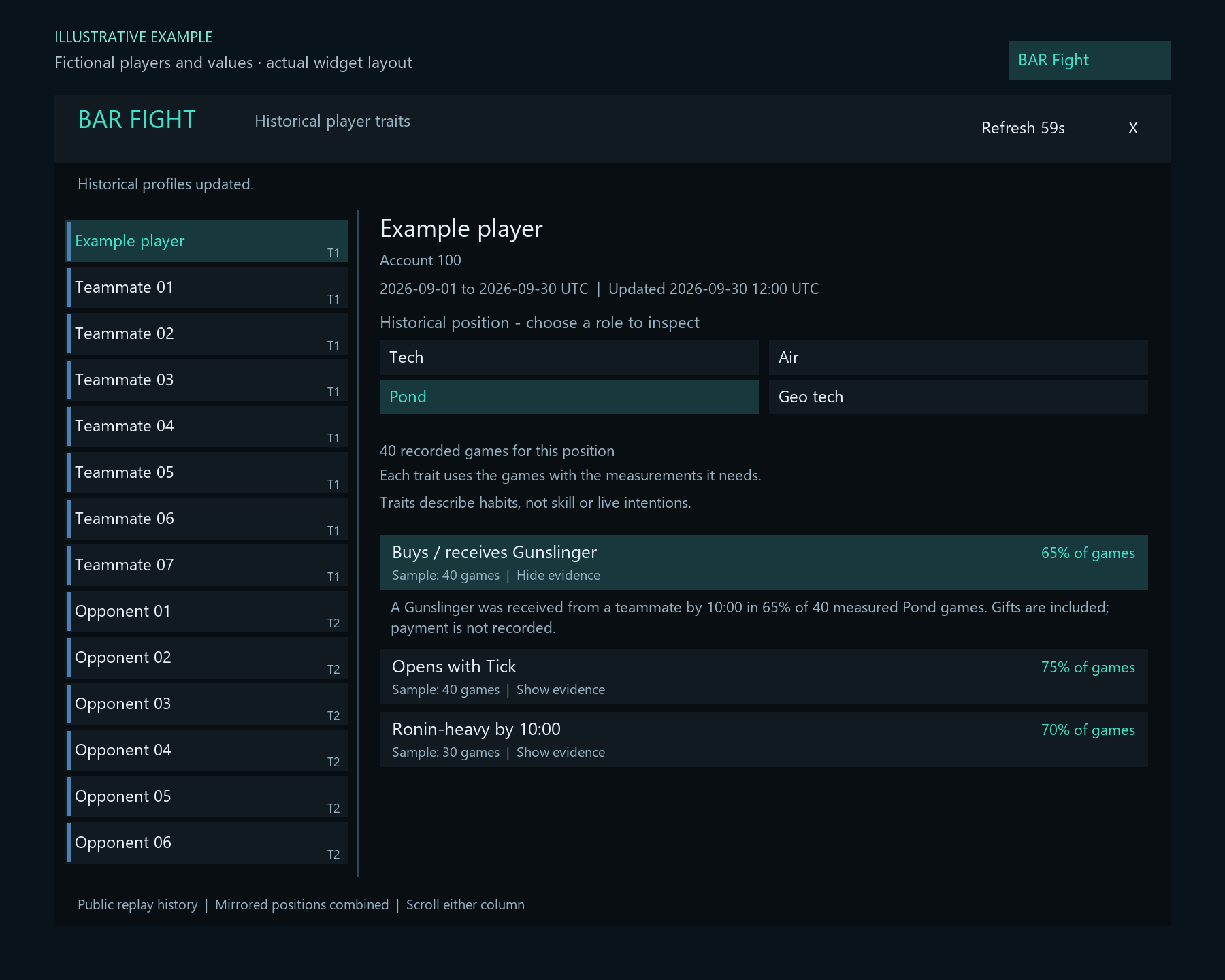
Select a name from the list on the left.
Inspect a historical role, such as Air, Tech or Pond.
Review dates and sample sizes. Click a trait to expand its explanation.
Get started
Install once. Keep the helper running.
The Windows installer sets up the widget and its small background helper for your user account.
Run the installer
Download and open BAR-Fight-Setup-0.1.4.exe. It also upgrades earlier versions installed for the same BAR data folder.
Choose your BAR data folder
Select the folder containing
LuaUI. The parent installation folder also works if it containsdata/LuaUI.Start the BAR Fight helper
Keep the helper running while you play. You can opt into starting it when you sign in to Windows, or open BAR Fight helper from the Start menu before playing.
Enable the widget in BAR
Restart BAR or reload its UI. Enable custom widgets if needed, then enable BAR Fight Traits in the widget list.
Open the panel and choose a player
Click the BAR Fight button or type
/barfight. Select a player on the left, choose a historical position, then click a trait to see its evidence. Scroll either column for more.
Good to know
A clearer view of the history.
Recorded habits describe past games. They are not a skill rating or a prediction of this match.
How BAR Fight uses replay data →How should I read the percentages?
Each habit uses its own measured games, so its sample can differ from the position's total. The panel shows the frequency and sample size; click the trait to read its explanation. Dates and update status stay above the position choices. Mirrored starting positions are combined. A common habit does not tell you what a player will do next.
Buys / receives is based on teammate transfers. Those can include gifts; the records do not prove payment.
Does the widget use the same data as the website?
Yes. The widget and website use the same combined replay history and trait rules, with each game counted once. The widget covers Supreme Isthmus v2.1, human 8v8 games lasting at least five minutes, over the last 30 UTC days. To compare the numbers on the website, choose the same dates, position and 8v8 format, with game version and faction set to All.
Construction traits use completed builds; Buys / receives uses recorded teammate transfers. Each trait shows the games with usable measurements, so its sample can be smaller than the position's total.
Why does a player have no traits, or an old profile?
Each habit needs at least 10 games with the required measurements in that position. A larger history total does not mean every game has those measurements. Missing account IDs, insufficient history, no qualifying habits and offline results have separate messages. Newly encountered accounts can show that a profile is being prepared. When cached history is stale, the panel keeps a warning visible. Missing traits are not a negative rating.
What data does the helper send?
The current map name and up to 16 public BAR account IDs are sent over HTTPS to retrieve cached profiles. Account IDs match players without guessing from names. The widget does not record gameplay, upload local replay files or start simulations.
The helper and widget exchange small local files in LuaUI/Config. Hovering makes no network request. The helper responds to widget requests and otherwise stays idle. A pending fetch may retry briefly after you disable the widget.
Can I also get a quick view by hovering?
Yes. Hover over a player's name in BAR's built-in player list and pause briefly for a compact popup with up to four habits. The full panel remains available through the BAR Fight button or /barfight.
Ordinary list clicks and resource or ping tooltips are preserved. A custom replacement player list may need its own integration. If a future game update changes the built-in list in an unsupported way, the original list stays in place and the separate panel remains available.
Why might Windows show an unknown publisher?
The current installer is unsigned, so Windows may show an unknown publisher. The published SHA-256 checksum is available if you want to verify the downloaded file.
How do I uninstall or change the BAR folder?
Open Windows Installed apps → BAR Fight Traits and uninstall. This stops the helper and removes its two widget files and request/response files, leaving other BAR widgets and game data in place. Restart BAR or reload its UI afterward.
To use another BAR data folder, uninstall first, then reinstall and select that folder.
Explore the history from inside BAR.
BAR Fight Traits 0.1.4 for Windows